SEO guide
ProRankTracker Review: Features, Pros, Cons & Who It’s Best For
An evidence-led ProRankTracker review covering rank-tracking flexibility, Term usage, local and mobile tracking, client reporting, pricing, limitations, and who the tool is best suited for.
- ProRankTracker
- Rank Tracking
- SEO Tools
- Tool Reviews
If you mainly need to monitor keyword rankings across different devices, locations, and client projects, ProRankTracker gives you considerably more control than a basic “keyword + position” tracker.
That flexibility is also where the buying decision gets more complicated.
ProRankTracker charges around Terms, and a Term is influenced by the tracking combination you create. Tracking one keyword across multiple engines, devices, or locations can therefore consume more of your allowance than the headline keyword count might suggest.
During our walkthrough, we also found that reporting is a major part of the product. Scheduled reports, comparison reports, historical views, client-facing MyRanks access, exports, and user permissions make ProRankTracker particularly relevant to consultants and agencies.
The question is not simply whether ProRankTracker has enough features. It is whether its tracking model, reporting workflow, and pricing make sense for the way you actually work.
This review focuses on that decision.
What Is ProRankTracker?
ProRankTracker is a dedicated rank-tracking and reporting platform.
Its main job is to monitor search positions over time rather than act as a full SEO suite covering crawling, backlink research, content optimization, and every other SEO workflow.
The existing ProRankTracker Tool page covers the broader product overview. This review focuses on the more useful buying question:
Should you use ProRankTracker for your rank tracking?
What We Tested
For this review, we used a current ProRankTracker test account and walked through the live interface rather than relying only on product documentation.
The tested account showed a 100-Term free account, and ProRankTracker support confirmed that the trial lasts 7 days. The current official plans and pricing page also states that the trial includes 100 Terms for 7 days and does not require a credit card.
During the walkthrough, we tested or inspected:
- adding URLs and keywords;
- search and device configuration;
- location targeting;
- Term counting;
- ranking views;
- multi-URL tracking;
- reports and scheduled reports;
- export formats;
- historical and comparison reports;
- ranking alerts;
- MyRanks;
- sub-users and permissions;
- Update on Demand access;
- pricing and billing options.
Some capabilities, such as API usage itself, were not exercised directly. Where that happens in this review, we rely on current ProRankTracker documentation rather than present it as firsthand use.
Rank Tracking: More Flexible Than a Basic Position Checker
ProRankTracker’s basic Add Wizard separates setup into two practical questions:
- What do you want to track?
- Where do you want to track it?
You enter a URL and the keywords you want to monitor, then choose the tracking configuration.
In the account used for this review, the interface exposed tracking options including:
- organic desktop results;
- mobile localized results;
- Google Local Finder;
- Google Snack Pack;
- YouTube;
- Google Videos.
For mobile tracking, we saw separate options for:
- Android Phone;
- Android Tablet;
- iPhone;
- iPad.
The tested interface showed Google, Google Videos, and YouTube as available search destinations. We did not find Bing or Yahoo in the current selectors, so this review does not treat either as a currently verified feature.
That matters if non-Google search engines are part of your reporting requirements.
Local Tracking Is One of the More Useful Parts of the Setup
Local SEO users can configure location-specific tracking instead of relying on a broad national ranking.
During our walkthrough, the interface allowed location selection alongside language and device settings. We directly verified US state-level targeting, along with options for:
- Local Finder;
- Google Snack Pack;
- mobile localized results.
Current ProRankTracker local tracking documentation describes more granular local targeting, but the important distinction is that the current interface clearly supports location-specific tracking as part of the normal setup workflow.
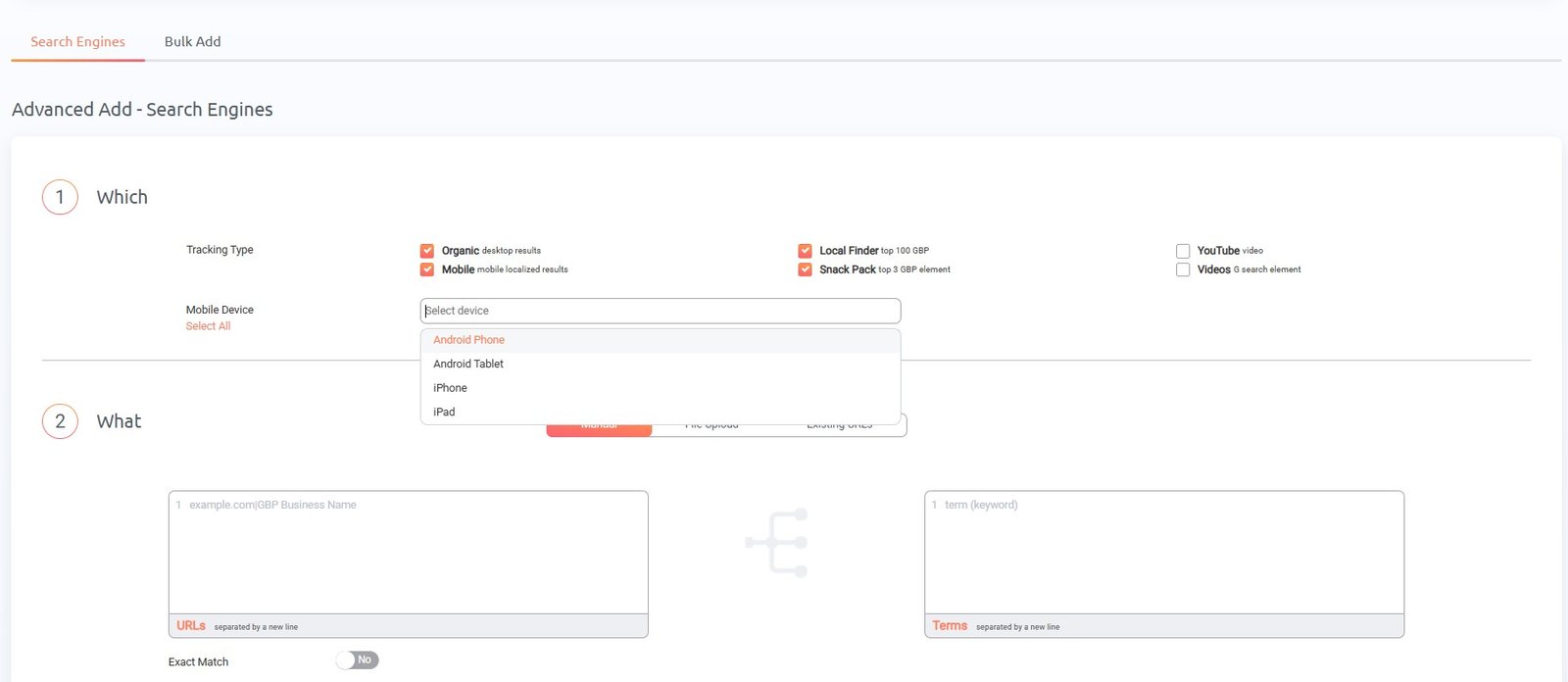
For agencies running campaigns across several service areas, that is more useful than a single generic ranking position.
The trade-off is that additional configurations affect how many Terms you use.
And that is the most important pricing concept to understand before subscribing.
How ProRankTracker Counts Terms
Do not read a plan that includes “1,000 Terms” and automatically assume that means you can monitor 1,000 unique keywords in every configuration you want.
During our walkthrough, ProRankTracker explicitly calculated:
3 Terms required = 3 keywords × 1 device × 1 Google engine
When we added another Google search configuration, the calculation became:
6 Terms required = 3 keywords × 1 device × 2 Google engines
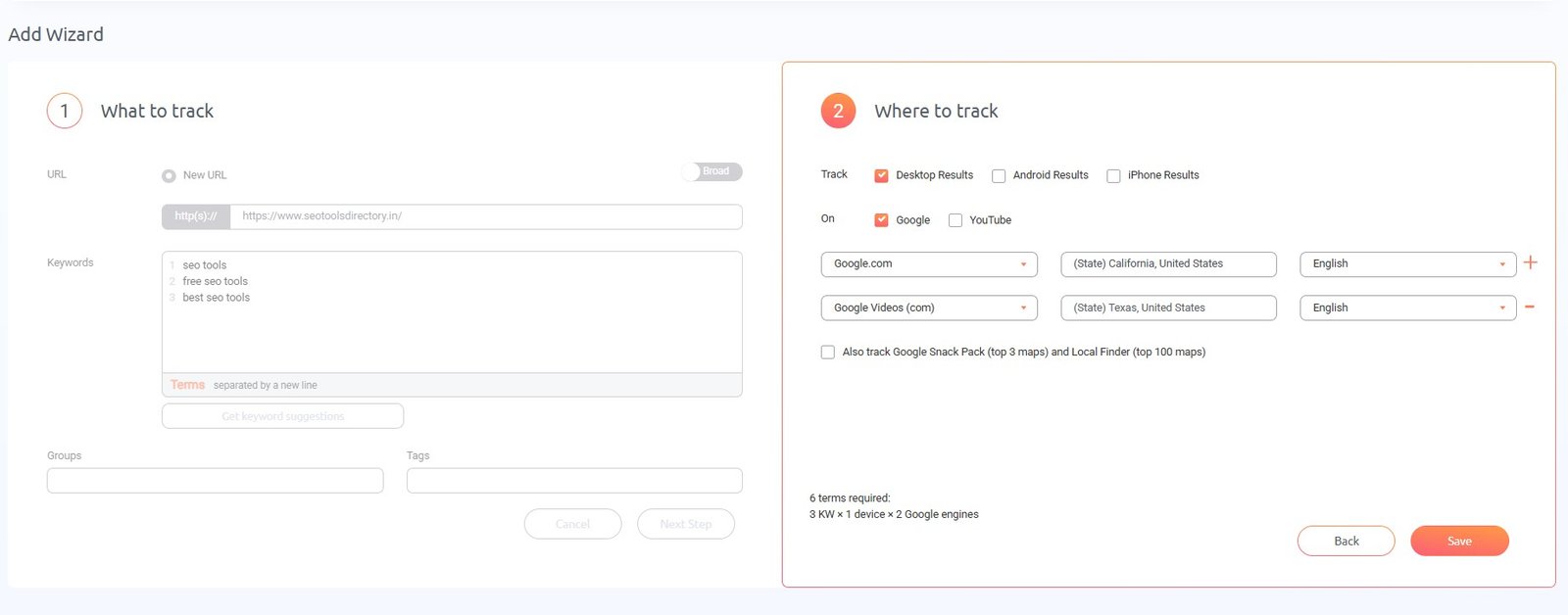
That demonstrates how the allowance works in practice. ProRankTracker’s current pricing documentation defines a Term as a keyword combined with a URL and engine/location/device configuration.
A keyword can consume additional Terms when you track it across more combinations of:
- search engine;
- device;
- location;
- URL.
Suppose you want to monitor the same keyword for desktop and mobile across three locations. That setup can consume substantially more capacity than tracking the keyword once on one device in one location.
This does not make the model inherently good or bad. It simply means the headline Term allowance is useful only after you map it to your real tracking requirements.
For a freelancer with a handful of clients and one primary market per client, 1,000 Terms may stretch much further than it would for an agency tracking many locations and devices.
What the Ranking Workflow Looks Like
Once keywords are added, ProRankTracker provides several ranking views, including:
- Dashboard;
- Project View;
- URL View;
- Term View;
- Daily View.
In our test account, the URL View displayed tracked Terms alongside their configured search combination, current rank, daily/weekly/monthly movement fields, local search volume, and trend data.
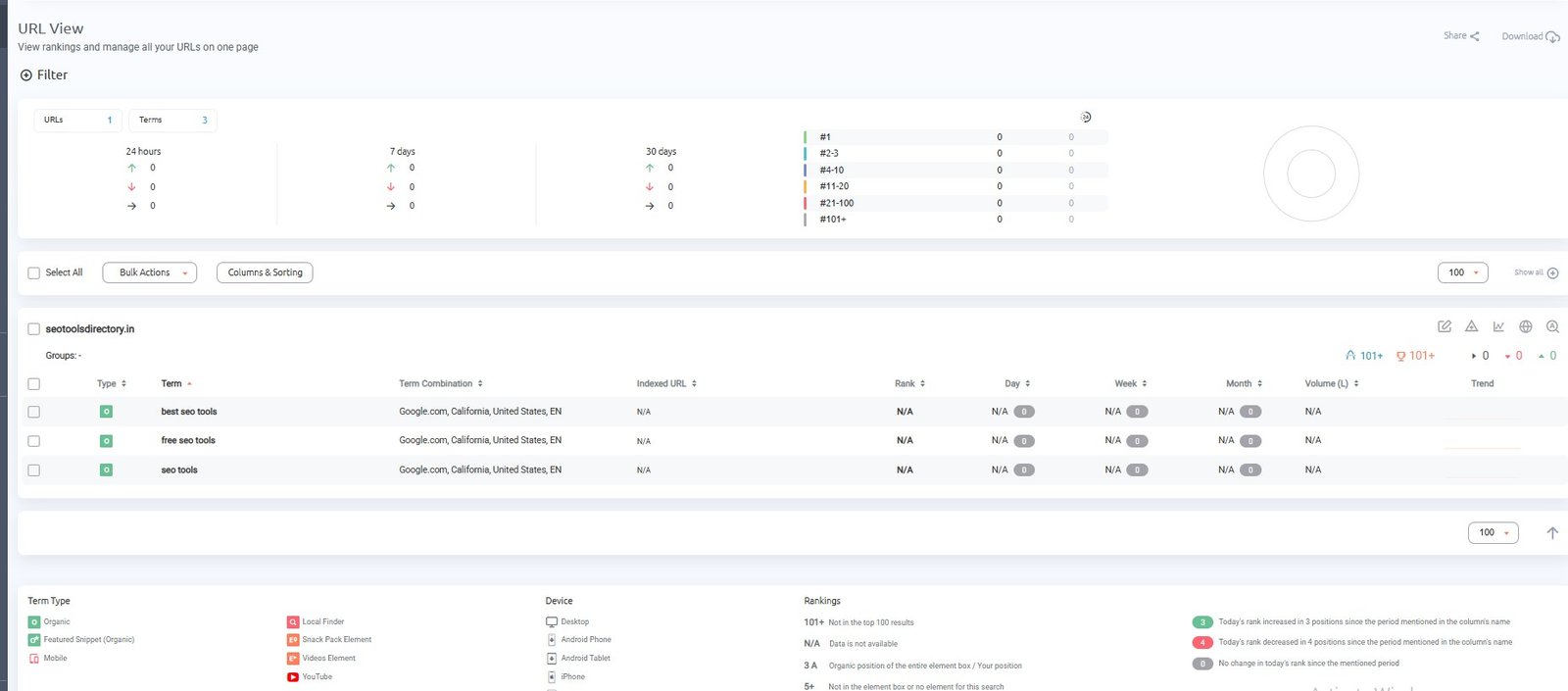
The tested keywords were currently reported as 101+, which is useful for understanding the interface but should not be mistaken for evidence about ranking accuracy.
We did not run a controlled accuracy benchmark against other rank trackers, so this review makes no claim that ProRankTracker is more or less accurate than competing products.
The more defensible takeaway is that the product gives you several ways to organize and inspect ranking data depending on whether you think in terms of projects, URLs, or individual keywords.
Reporting Is a Major Part of the Product
The reporting system is one of the more substantial areas we found during the walkthrough.
The Reports Center included:
Overview reports
- Overview Report;
- Projects Summary;
- Groups Summary;
- Tags Summary;
- Notes Reports.
Ranking comparison reports
- Different URLs;
- Search Engines;
- Different Locations;
- Different Devices.
Historical progress reports
- Daily Breakdown;
- Weekly Breakdown;
- Monthly Breakdown.
Benchmark reports
- Compare Two Dates;
- Compare Two Weeks;
- Compare Two Months.
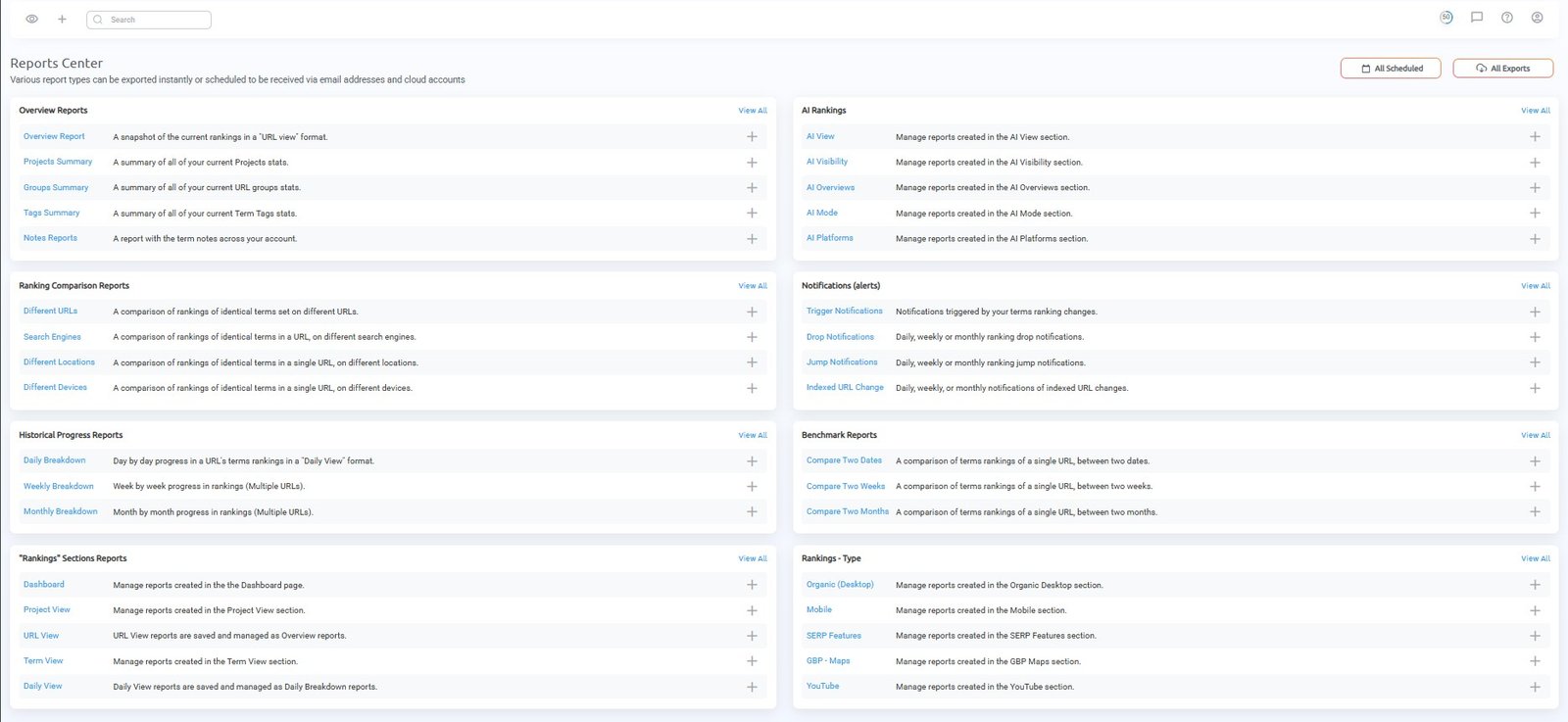
That makes ProRankTracker more relevant to users who need recurring reporting than to someone who only wants to check a handful of personal keywords occasionally.
The comparison reports are useful because they let you compare tracked ranking data from different angles without having to rebuild every comparison outside the platform.
Scheduled Reports and Export Options
We were able to open the scheduled-report builder directly.
Reports can be configured as:
- daily;
- weekly;
- monthly.
The interface also separates:
- scheduled reports;
- instant exports.
During testing, the available file formats included:
- PDF;
- XLSX;
- CSV;
- Email Content.
We also verified delivery/export options including:
- Email;
- Download;
- Shared Link.
Official ProRankTracker reporting documentation describes PDF, XLSX and CSV formats, email delivery, Google Sheets, Dropbox and Drive exports, and daily, weekly or monthly scheduling.
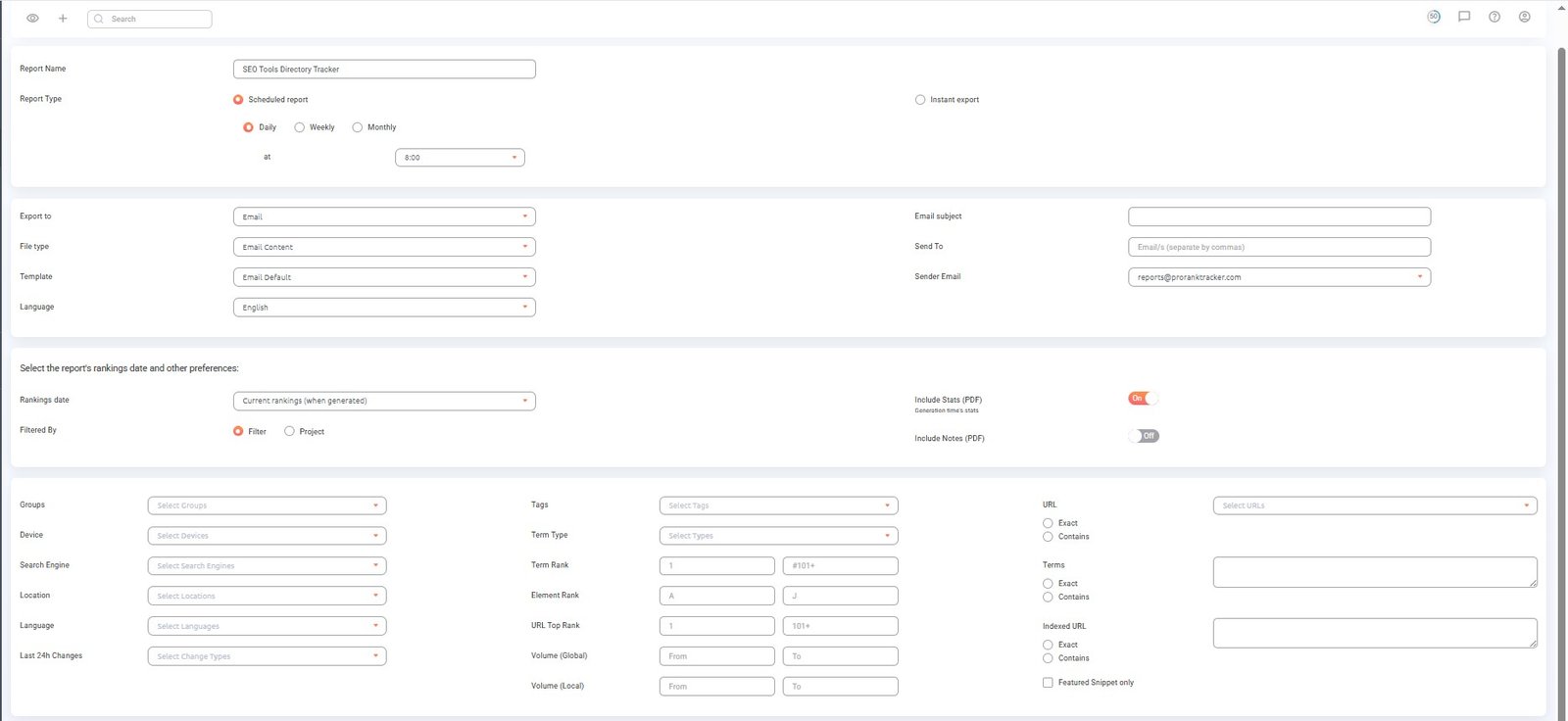
The report builder contains filters for device, search engine, location, language, groups, tags, ranking ranges, URLs, and Terms.
That flexibility is useful for consultants who do not want to send the same generic report to every client.
A local SEO client, for example, could receive a report filtered to their market and device configuration, while another client could receive a broader project report.
MyRanks Is Different From a Normal User Account
One of the more useful findings from our walkthrough was that MyRanks users and ProRankTracker account users are not the same thing.
MyRanks
The interface calls MyRanks a Mobile App and provides a separate area for managing MyRanks users. ProRankTracker’s official mobile apps page describes MyRanks as a client- and colleague-facing app included in Pro plans and above.
A MyRanks user can be created with:
- a username;
- email;
- password;
- language;
- access to a particular URL or Group.
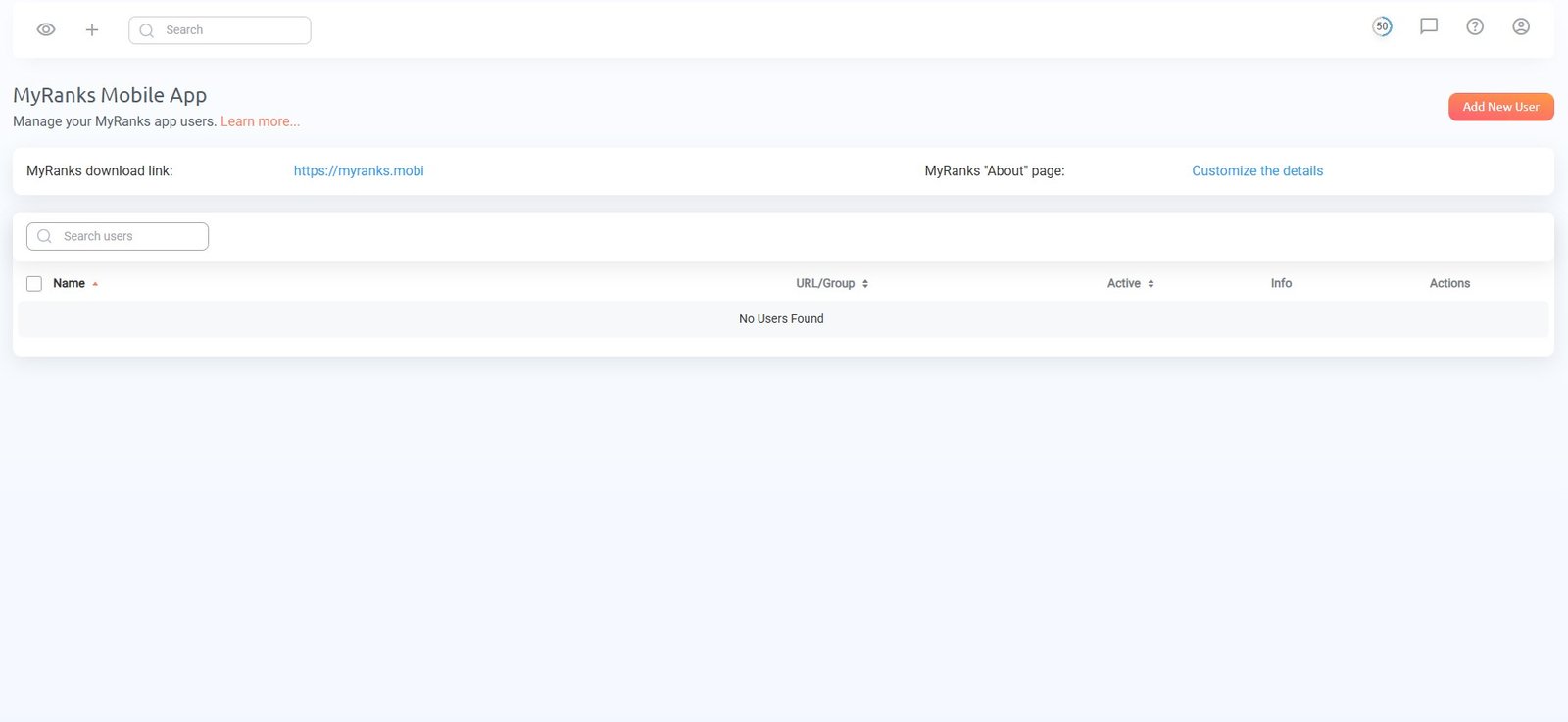
This makes MyRanks primarily a client-facing reporting mechanism.
Instead of giving a client access to your main ProRankTracker account, you can give them access to the data assigned to them.
Regular users and permissions
ProRankTracker also has a separate sub-user system for people working inside the account.
The tested interface showed configurable permissions for areas such as:
- Admin;
- Accounting;
- branding;
- editing URLs and Terms;
- adding Terms;
- adding or deleting URLs;
- cloud accounts;
- Insta Check;
- Update on Demand.
Users can also be assigned to specific groups.
This separation is useful for agencies where an SEO specialist, account manager, and client should not necessarily have identical access.
The tested free account showed its own user allowance, but that should not be used to infer the limits of commercial plans. For paid-plan limits, the current pricing page is the more appropriate source.
Update on Demand Is Not Available Everywhere
ProRankTracker includes an Update On Demand action in the interface.
However, when we tried to use it in the free account, the platform displayed an upgrade prompt rather than allowing the manual refresh.
The current pricing page places Update on Demand among Agency-level features.
So the practical point is simple:
Do not assume that seeing the option in the interface means your plan includes it.
If manual refreshes are important to your workflow, verify the current entitlement for the plan you are considering before subscribing.
This is a good example of a feature that exists in the product but is plan-dependent.
Historical Data and Ranking Alerts
ProRankTracker includes historical reporting options alongside ranking-change notifications.
During the walkthrough, the Reports Center exposed:
- Daily Breakdown;
- Weekly Breakdown;
- Monthly Breakdown;
- Compare Two Dates;
- Compare Two Weeks;
- Compare Two Months.
It also showed alert types for:
- ranking triggers;
- drops;
- jumps;
- indexed URL changes.
The main limitation for any new account is straightforward: historical reporting becomes more useful after the account has accumulated tracking data.
A new account cannot provide months of meaningful account-specific history immediately after setup.
That is not unique to ProRankTracker, but it is worth remembering when evaluating a short trial.
API and Integrations
According to current ProRankTracker documentation and pricing information, API access is available within its higher-tier offering, and lower tiers may have separate access arrangements depending on the current plan structure.
We did not test the API directly, so this should be treated as a documented capability rather than a firsthand finding. The official rank tracking API page currently states that API access is included with Agency plans or available as an add-on to lower tiers.
The current pricing interface also lists Looker Studio Integration at the Pro level, and we were able to access the Looker Studio reporting section during the walkthrough. ProRankTracker also documents its Looker Studio integration separately.
For most freelancers and smaller agencies, reporting and client access will probably be more immediately relevant than the API. Larger agencies or teams building their own reporting systems should verify the current API limits and commercial terms before choosing a plan.
ProRankTracker Pricing
Pricing changes, so these figures should be rechecked immediately before publication.
At the time of this review, the current ProRankTracker interface showed:
| Plan | Terms | Monthly billing | Annual billing |
|---|---|---|---|
| Starter | 1,000 | $99/month | $89/month equivalent — $1,069 paid yearly |
| Pro | 2,000 | $149/month | $134/month equivalent — $1,609 paid yearly |
| Agency | 3,000 | $199/month | $179/month equivalent — $2,149 paid yearly |
Agency plans scale beyond 3,000 Terms. During testing, we saw selectable allowances extending through at least 20,000 Terms.
The pricing question is therefore not simply:
Which plan has enough keywords?
A better question is:
How many Term combinations will my actual tracking setup consume?
A local agency tracking desktop and mobile results across several markets can use Terms considerably faster than an in-house team tracking one market.
The plan differences also matter beyond Term count.
Current pricing places features such as:
- MyRanks;
- additional users;
- Looker Studio;
- API access;
- Update on Demand;
- higher user allowances;
at different tiers.
So value depends on both tracking volume and workflow requirements.
ProRankTracker Pros
Granular tracking configurations
You can combine keywords with different devices, locations, and search configurations instead of relying only on one generic ranking position.
This is especially useful for local SEO and multi-market tracking.
Strong reporting options
Scheduled reports, historical reports, benchmark comparisons, URL comparisons, and multiple export formats give consultants and agencies several ways to deliver ranking data.
Client-facing access through MyRanks
MyRanks provides a separate client-access mechanism tied to specific URLs or groups, reducing the need to expose the main account.
Granular user permissions
Regular sub-users can have different permissions and group assignments, which is useful for team accounts.
Useful local tracking options
Local Finder and Google Snack Pack tracking are available alongside localized mobile and desktop configurations.
Several report export formats
PDF, XLSX, and CSV were all available during testing, along with email and Shared Link workflows.
ProRankTracker Cons and Trade-Offs
Term usage can rise faster than expected
The main pricing trap is assuming that one keyword always equals one Term.
The tested interface clearly showed that additional tracking combinations increase Term consumption.
If you need multiple locations, devices, and search configurations, calculate that before choosing a plan.
Some useful features are plan-restricted
Update on Demand existed in the interface but was unavailable to the tested free account and triggered an upgrade message.
Other features such as API access and larger user allowances are also tied to higher plans.
Higher-volume tracking becomes a larger budget decision
The Agency plan starts at a higher Term allowance and increases as tracking volume grows.
That can be reasonable for an agency actively using the reporting and client-management features, but a user who only needs simple keyword monitoring should compare the required Term count against lighter alternatives.
Advanced setup is denser than the basic wizard
The standard Add Wizard is relatively straightforward.
Advanced Add exposes considerably more options at once, including multiple URLs, tracking types, mobile devices, locations, and organization settings.
That flexibility is useful, but users wanting a very minimal rank tracker may find they do not need all of it.
New accounts have limited account-specific history
Historical reports become more useful after enough ranking data has accumulated.
A seven-day trial is enough to inspect the workflow, but not enough to evaluate long-term historical reporting in depth.
Who ProRankTracker Is Best For
SEO consultants
Consultants managing several client sites can benefit from scheduled reports, client-facing MyRanks access, and local/device-specific tracking.
SEO agencies
The combination of multi-URL tracking, reporting, sub-users, permissions, comparison reports, and higher-volume plans fits agency workflows particularly well.
Agencies should pay close attention to Term consumption because multiple clients, locations, devices, and tracking configurations can multiply usage quickly.
Local SEO practitioners
Local Finder, Snack Pack, and localized device tracking make the product particularly relevant when ranking visibility changes by geography.
Teams that care more about rank tracking than a full SEO suite
If rank monitoring and reporting are the primary requirements, a dedicated tracker can make more sense than paying for a broader SEO platform only to use its rank-tracking module.
Who Should Compare Alternatives
ProRankTracker may be less obvious as a first choice if you mainly need:
- a very small number of simple keyword checks;
- verified Bing or Yahoo tracking;
- a broader all-in-one SEO suite;
- crawling, backlinks, content research, and rank tracking in one subscription;
- large multi-location tracking without wanting to manage Term economics;
- manual on-demand updates on a lower-priced plan.
In those situations, compare the actual workflow you need rather than only the headline number of tracked Terms. You can also browse other rank tracking tools that may better match a simpler or broader workflow.
Final Takeaway
ProRankTracker makes the most sense if rank tracking and reporting are important enough to justify a dedicated platform, especially when you need combinations of local, mobile, and client-specific tracking.
Its stronger areas are not simply the number of keywords it can monitor. The more meaningful advantages are the ability to configure tracking by device and location, compare ranking data, automate reports, manage client access through MyRanks, and separate team permissions.
The main buying consideration is the Term model.
Before choosing a plan, map out how many keywords you need to track, then factor in the devices, locations, search configurations, and URLs that matter to you. That gives you a much more realistic picture of the plan you actually need.
One thing that may matter to some users is the interface itself. Based on our walkthrough, the core workflows are functional, but parts of the UI feel visually dated compared with more contemporary SaaS products in 2026. That does not reduce the underlying tracking or reporting capability, but users who place a high value on a more modern interface may notice the difference.
You may want to compare alternatives if your requirements are simpler, if you need a broader SEO platform, or if the tracking combinations you need push you into a substantially higher Term tier than expected.